Sunday, 9 October 2022

AVR Dx Programmer

The new range of AVR Dx microcontrollers from Microchip are proving to be very useful and showing a lot of potential for future projects. These are an evolution of the older Atmel AVR micrcontrollers such as the ATmegas and AT90USB etc. These add features such as configurable logic blocks (think mini GALs), load more peripherals and timers, one port that can run at a different IO voltage (avoid line drivers for SD cards) and integrated OP Amps and comparators.

The main problem I had when starting to use them was programming them. They do not use the old SPI based ICSP of the ATmegas or even the one wire programming pin / reset line seen in some of the Atmel ARM chips. No, these use UPDI, the Unified Program and Debug Interface.

I mention the ARM OPD as that combined program and reset pin would have been beneficial here on low pin count devices (they make these down to 14 pin now). They have a separate reset pin which can only be used as an input with a weak pullup. It can't be configured as an actual reset pin, other than by programming a fuse which warns that it will break UPDI programming if you do. It would have been nice if it was a combined reset and programming pin and one more general IO pin.

Unfortunately this is not supported by any of the programmers I currently have (and lets not talk about the Atmel Snap which claims to support lots of things but I can never get any of them to work more than once if at all).

I did look into a few other things at this point. There is an Arduino core for these microcontrollers which looks interesting, and I had some success using an Arduino acting as a jtag2updi programmer with avrdude command line, but at the time that was still experimental.

Determined to at least try these chips out, I thought I would look at the "all in one" solution, the AVR Curiosity Nano.

This has an integrated programmer / debugger, and that did seem to work. I did a bit of prototyping on another project using one of these on a breadboard.

That was proving a viable setup, so I ended up integrating one into the prototype of the Minstrel 4D.

That worked out well, but was obviously not a practical option for subsequent boards.

It says in the manual that the programmer section on the Curiosity Nano can be used to program external devices, this just needs three wires (ground, power sense and UPDI)

There are pads on the back that have to be cut which disconnect the programmer from the onboard device.

Let's give this a go.

I was pleased to be rewarded by a flashing LED on my test chip.

Time to make that (more) permanent.

I covered the board in heatshrink, so I could use it as just a programmer (only two wires are used here, just ground and UPDI).

That worked well during the development of the Minstrel 4D and another couple of products I am working on.

Now as I move towards production, I need a different solution.

Looking around again and nothing jumped out as supporting these chips.

So I made this.

Again, this is relying on the programmer on Curiosity Nano board. I did look at whether I could replicate this circuitry, but there are a lot of parts only available in small packages (if they are available at all in 2022), and the Curiosity Nano boards are actually available and only about £15 each, so it didn't seem worth the effort.

The actual onboard device is redundant, but still decorative at it's jaunty angle.

Only power and the UPDI data line are connected to the ZIF socket, and they can be switched off to allow the device to be safely removed.

That should allow me to program the microcontrollers for the kits.

But also I have fitted a header so that I can still program the Minstrel 4D prototype.

The firmware is pretty much done, but I want to be sure before I go through many tubes of microcontrollers, programming each one, as I don't want to have to go back and do that again.

Advertisements

The Minstrel 4D is available for preorder from The Future Was 8 bit. The parts are all here and the kits are currently being assembled to ship in the next few months.

https://www.thefuturewas8bit.com/minstrel4d.html

More info in a previous post:

http://blog.tynemouthsoftware.co.uk/2022/08/minstrel-4d-overview.html


Patreon

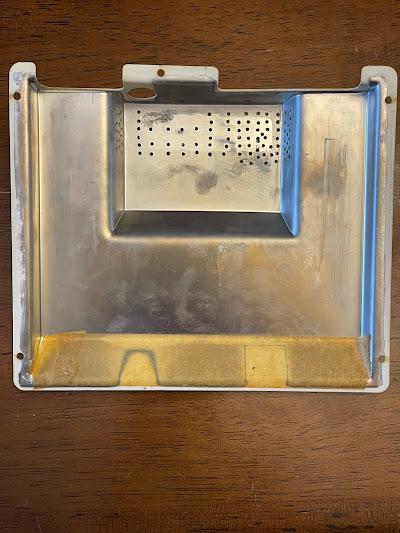
You can support me via Patreon, and get access to advance previews of posts like this and behind the scenes updates. These are often in more detail than I can fit in here - I skipped over a lot of time I wasted trying to get the Atmel Snap programmer to work. Read all about how bad it must have been to deserve this main image for the Patreon post.

This now also includes access to my new Patreon only Discord server for even more regular updates.

https://www.patreon.com/tynemouthsoftware

Sunday, 2 October 2022

ZX80 USA

A friend in the US recently picked this up. At first glace, this might look like a normal ZX80, with the unfortunate 8K BASIC upgrade fitted and the inevitable damaged case corner.

However, turning it over reveals something rather unusual.

The normal label on the back of a ZX80 is fairly simple, Sinclair ZX80, made in England, only use the proper power supply, and then Sinclair again, in case you forgot.

This is "Model No. ZX80 USA".

A factory NTSC ZX80 briefly sold in North America, fully assembled. "The first personal computer for under $200". Although they were soon in competition with a ZX80 clone, the MicroAce for $149 - see a previous repair of one of those - http://blog.tynemouthsoftware.co.uk/2017/06/microace-repair.html

Note, this has FCC identification, although I'm not sure it had FCC approval. There is metalised shielding on the inside of the case, as seen in things like the Timex version of the ZX81, the TS1000.

Inside, it is the same PCB as a UK model (PCB issue 2A), with some difference in the parts fitted. The specs are the same, 3.25MHz Z80A, 1K RAM, 4K or 8K ROM BASIC, 40 key membrane keyboard, 32x24 monochrome text display.
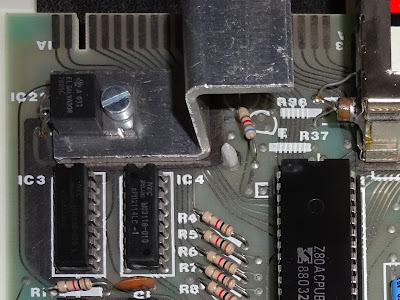
There are extra grounding prongs to contact the shielding on top of the modulator and on the back of the board, and also some extra parts around the cassette input and output, presumably also related to FCC approval?

The keyboard has an overlay stuck over it with the ZX81 style keywords (and the UK "Rubout", and "New Line", rather than "Delete" and "Enter" as the TS1000 version would later have).

I have never seen a chip marked as 8KEP/BASIC before. They are normally just D2364 OTP ROMs.

In 1981, you could buy an upgrade kit consisting of an 8K BASIC ROM, ZX81 manual and a keyboard overlay. This was listed along side the short lived ZX81 USA (before that has handed over to Timex to become the TS1000). The 8K ROM upgrade for the ZX80 was $39.95, compared to $99.95 for the ZX81 kit or $149.95 for the assembled version. At around the same time, Bill Shatner was trying to persuade you to buy a VIC20 with colour and sound and a proper keyboard for only $299.95.

If you decided to go down the upgrade route, you would take your ZX80 with it's lovely blue keyboard and carefully open the case, trying to damage no more than one corner of the case whilst doing so. (note an almost identical broken corner on my ZX80 -  maybe they shipped from the factory like that?)

You would then place the supplied grey overlay on top of that. It was just an overlay, it was not adhesive and had no key contacts.

The idea was the case and case rivets would hold it in place, although many of them seemed to end up being glued once the cases started to fall apart. 

I know the ZX80 can be upgraded to run the 8K floating point BASIC from the ZX81, and that it is more powerful, but since the ZX80 does not support SLOW and FAST (even though they are printed on the overlay), you can't run a lot of ZX81 games. I prefer to see a ZX80 with its original colours and its original 4K integer BASIC. If I want to use 8K BASIC, I will use a ZX81.

If you really want 8K BASIC, then you can use one of my stick on overlays with the ZX81 keyboards in ZX80 colours.

Internal differences

Looking at the ZX80 USA board, there are three main differences.

Firstly, there is a diode, D11, between the 74LS365 and the 74LS165. This is used to tell the ROM code to generate a 60Hz frame rate for NTSC rather than 50Hz for PAL regions.

This is not fitted on normal UK models.

A diode you say, how does that work? Well, it's about the cheapest way you can do an IO port.

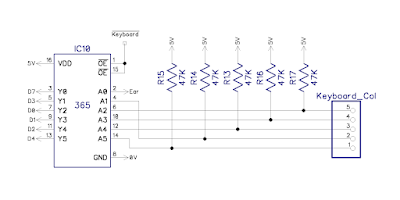
There is already a 6 bit input port built around the 74LS365, 5 bits for the keyboard columns, and 1 bit for the cassette input. They could have changed that to a 74LS245 to make it a full 8 bit port, but instead, they cheated.

The existing port is controlled by a signal /Keyboard, which goes low when that port is being read. On the NTSC model, they fit D11, which is wired between the control signal and D6. When the signal goes low, it pulls the D6 data line low.

On the Minstrel 2, I fitted a jumper to take the diode in or out of circuit to select PAL or NTSC. I should say there is no colour burst for either standard, so all it is really doing is changing between 50Hz and 60Hz frame rate. The line remains a constant 64uS, which is correct for PAL, and close enough to 63.55uS for NTSC. The lack of colour burst does confuse some modern TVs, but the lack of back porch has normally lost most of them already.

The second change is the modulator. Here it is a UM1082E3, a VHF modulator for NTSC.

The UK model has a UHF UM1233 modulator for PAL, like most home computers in the UK in the 1980s, although, the ZX80 must have been one of the first to use it? Note the phono jack for RF out is on the left on the UM1233, but on the right in the UM1082 - not sure why they did that, it may have been dictated by some of the RF magic within?

There is an extra transistor under the heatsink which is not fitted in the UK model. This is an E-line ZTX238, presumably to boost or buffer the composite video signal to the modulator. I have not seen this on any of the schematics, the standard one shows D11 (the optional NTSC selection diode), but not this transistor or most of the extra cassette input circuitry.

Special mention to the extra "factree" cooling fins on the heatsink. Well done to whoever did that.

The UK version has the outline for that transistor, and capacitor, but they are not fitted (and also an unadorned heatsink).

The final changes are to the composite video and cassette input / output circuitry, although it is not clear enough to be able to reverse engineer what is different, including some extra parts on the back of the USA model around the cassette jacks.

Also, a valiant attempt to turn the "pictures of slots" into "actual slots" on the top of the case to improve cooling.

I imagine the plan may have been to drill rows of holes and then file out the slots. They started well, but went a bit off course, then just threw in as many holes as they could fit.

Being a ZX80, this has only an RF output, and the signal generated contains no back porch signal, so even if you have a modern TV with an RF tuner, it is likely to display a very dark picture due to the black level being set too high. (read more about that when I first updated the Minstrel ZX80 clone video to add a back porch - http://blog.tynemouthsoftware.co.uk/2017/01/minstrel-zx80-clone-video-output.html)

The solution is of course a vintage TV, a nice General Electric model in this case.

Seems an ideal opportunity to check if the inverted character glitch is visible in this setup (see the three posts starting http://blog.tynemouthsoftware.co.uk/2022/09/minstrel-2-pixel-synchronisation-part-1.html)

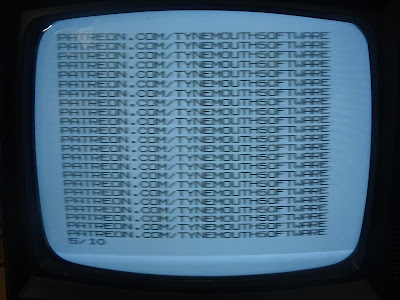
As expected, there is no visible glitch on the inverted character, just the bright shadowing caused by the way the TV deals with previously mentioned missing back porch signal.

Note: I don't actually have any ZX80s on my bench today. Thanks to Bill Bright for the pictures of the ZX80 USA, and past me for pictures of the UK model.


Advertisements

If you fancy building your own PAL or NTSC ZX80 close, then Minstrel 2 V2.9 PCBs are available from my SellMyRetro store

https://www.sellmyretro.com/offer/details/62001

There are also a couple of built and tested Minstrel 2 boards. Either blue V2.7 PCB, designed to fit in a ZX81 case

https://www.sellmyretro.com/offer/details/62386

Or green V2.7PCB setup for stand alone use with a ZX81 Membrane or other keyboard.

https://www.sellmyretro.com/offer/details/62387

I haven't listed any kits, but if you are interested, let me know and I'll see what I can sort out.

I am also open to sensible offers on the built units, and possibly international shipping if you are prepared to accept the potential issues that may involve.


Patreon

You can support me via Patreon, and get access to advance previews of posts like this and behind the scenes updates. This now also includes access to my new Patreon only Discord server for even more regular updates.

https://www.patreon.com/tynemouthsoftware